Scene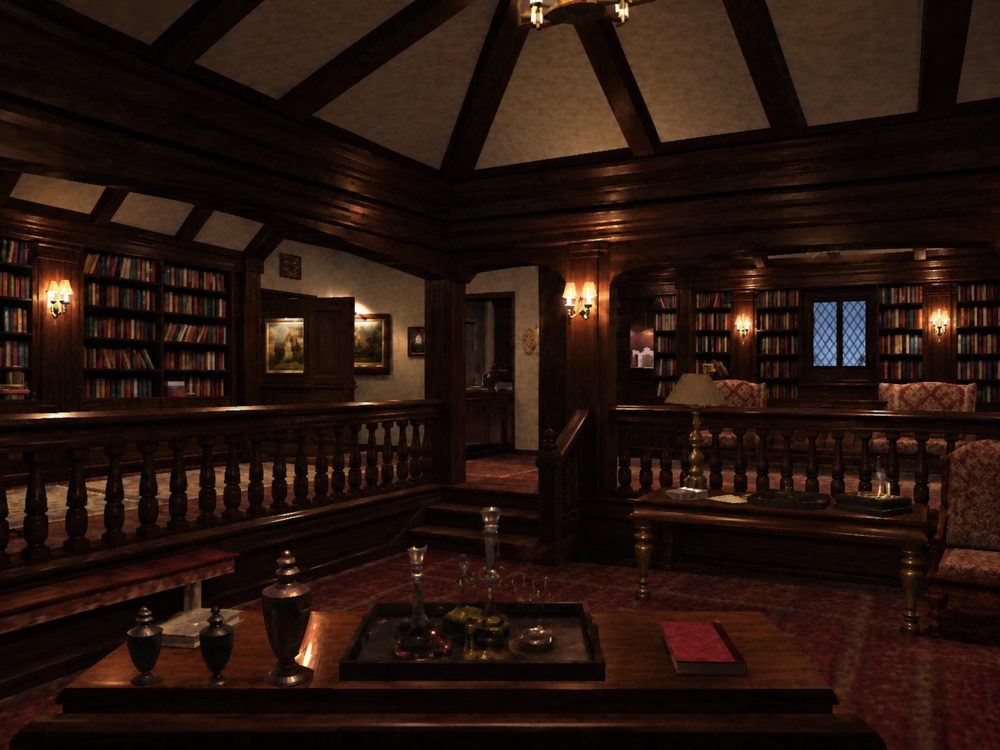
Character
cinematic ps2 cutscene, mansion library at night, brooding character in black jacket, warm lamp glow
Learn the exact process behind our viral nostalgic game-cutscene clips. No editing skills needed, and priced so anyone can start.
A look inside the studio: an example scene, a character and the prompts behind them. Prompts are blurred here and unlocked in the course.
Hover over the window.
Three missions from idea to a finished clip.
Understand what makes a video feel like a PS2 game, so you know what to ask the AI for.
Follow the prompts and workflow to create scenes, characters and camera moves.
Add sound, export for Instagram and publish videos made to be watched and shared.
Pick a lesson to see what’s inside.
Everything you need to make your first video and keep going.
A 25-page walkthrough from idea to finished clip.
Ready-to-use prompts for the PS2 look.
The process behind the clips that reached 225M views.
How to package and publish your videos on Instagram.
If you like game nostalgia and want to make videos people watch, this is for you.
Never made an AI video? You’ll start from the basics.
Add a distinctive style to your content and stand out in the feed.
Want more reach on Instagram? Learn the format that’s working for us.
No. The guide starts from the basics and builds up to full PS2-style clips.
A computer, a ChatGPT account and access to Google Flow. The guide walks you through both tools.
As soon as your payment is confirmed on the blockchain, a download button appears on the page and we email you a private link too. This usually takes a few minutes.
With crypto: USDT, Bitcoin or Ethereum from any wallet.
Yes. The guide shows you how to make clips built for Instagram and short-form feeds.
Results vary. The guide gives you our process, but views and followers depend on your ideas and how consistently you post.
No. You can start from zero and build as you post.
Get the guide and learn the PS2 AI video style that’s taking over feeds.
Get instant accessEnter your email, then send the payment in crypto.
We send your access link to this email.
Pick a coin, then scan the QR code or copy the address. This page updates by itself when your payment is confirmed.
Amount to send
Wallet address
Payment status
Waiting for your payment…
Your order reference
Keep it handy. If you need help, send us this reference.